Thứ Bảy, 30 tháng 7, 2011

ASP.NET MVC 3 and the @helper syntax within Razor

ASP.NET MVC 3 supports a new view-engine option called “Razor” (in addition to continuing to support/enhance the existing .aspx view engine).  Razor minimizes the number of characters and keystrokes required when writing a view template, and enables a fast, fluid coding workflow.
Unlike most template syntaxes, with Razor you do not need to interrupt your coding to explicitly denote the start and end of server blocks within your HTML. The Razor parser is smart enough to infer this from your code. This enables a compact and expressive syntax which is clean, fast and fun to type.

You can learn more about Razor from some of the blog posts I’ve done about it over the last last 9 months:
Today’s blog post covers a cool feature of Razor that a lot of people don’t know about – which is the ability to define re-usable helper methods using the @helper syntax.

Simple @helper method scenario

The @helper syntax within Razor enables you to easily create re-usable helper methods that can encapsulate output functionality within your view templates.  They enable better code reuse, and can also facilitate more readable code.  Let’s look at a super-simple scenario of how the @helper syntax can be used. 
Code before we define a @helper method
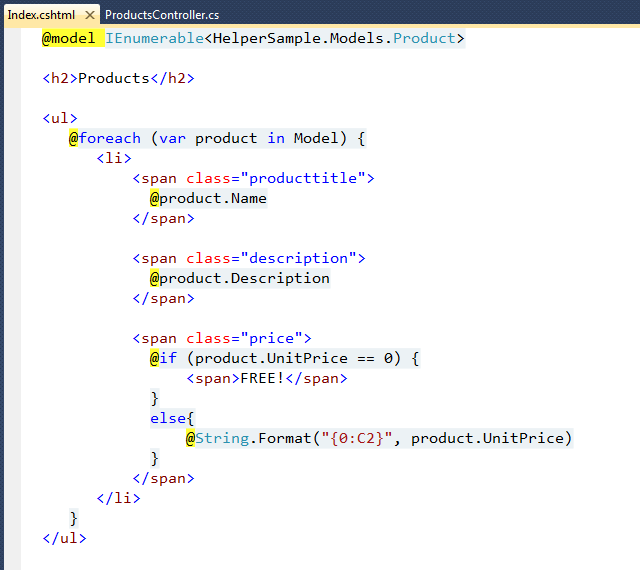
Let’s look at a simple product listing scenario where we list product details, and output either the price of the product – or the word “FREE!” if the item doesn’t cost anything:
image
The above code is fairly straight-forward, and Razor’s syntax makes it easy to integrate server-side C# code within the HTML. 
One place that is a little messy, though, is the if/else logic for the price.  We will likely output prices elsewhere within the site (or within the same page), and duplicating the above logic everywhere would be error-prone and hard to maintain.  Scenarios like this are prime candidates to extract and refactor into helper methods using the @helper syntax.
Refactoring the above sample using the @helper syntax
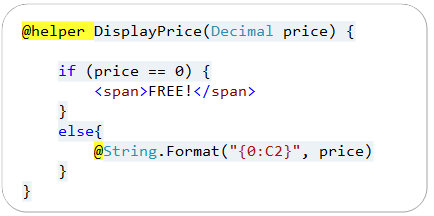
Let’s extract the price output logic, and encapsulate it within a helper method that we’ll name “DisplayPrice”.  We can do this by re-writing the sample to the code below:
image
We’ve used the @helper syntax above to define a reusable helper method named “DisplayPrice”.  Just like a standard C#/VB method, it can contain any number of arguments (you can also define the arguments to be either nullable or optional).  Unlike standard C#/VB methods, though, @helper methods can contain both content and code, and support the full Razor syntax within them – which makes it really easy to define and encapsulate rendering/formatting helper methods:
SNAGHTML20fae4df
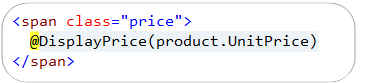
You can invoke @helper methods just like you would a standard C# or VB method:
SNAGHTML20fcdc86
Visual Studio will provide code intellisense when invoking the method:
image

Reusing @helpers across multiple views

In the example above, we defined our @helper method within the same view template as the code that called it.  Alternatively, we can define the @helper method outside of our view template, and enable it to be re-used across all of the view templates in our project.
We can accomplish this by saving our @helper methods within .cshtml/.vbhtml files that are placed within a \App_Code directory that you create at the root of a project.  For example, below I created a “ScottGu.cshtml” file within the \App_Code folder, and defined two separate helper methods within the file (you can have any number of helper methods within each file):
SNAGHTML2107b6ae
Once our helpers are defined at the app level, we can use them within any view template of our application. 
The ScottGu.cshtml template in the \App_Code folder above will logically compile down to a class called “ScottGu” with static members of “DisplayPrice” and “AnotherHelper” within it.  We can re-write our previous sample to call it using the code below:
SNAGHTML210d65c1
Visual Studio will provide code intellisense when calling app-level helpers like this:

image
May 15th Update: One issue that a few people have pointed out is that when a @helper is saved within the \app_code directory, you don’t by default get access to the ASP.NET MVC Html helper methods within it (e.g. Html.ActionLink(), Html.TextBox(), etc).  You do get access to the built-in HTML helper methods when they are defined in the same file as your views.  This is not supported out of the box, though, when the helpers are within the \app_code directory - we’ll add this in the next release.  Paul Stovall has a nice helper class that you can use in the meantime to access and use the built-in Html helper methods within @helper methods you define in the \app_code directory.  You can learn how to use it here.

Summary

Razor’s @helper syntax provides a convenient way to encapsulate rendering functionality into helper methods that you can re-use within individual view templates, or across all view templates within a project. 
You can use this functionality to write code that is even cleaner and more maintainable. 
Hope this helps,
Scott
P.S. In addition to blogging, I am also now using Twitter for quick updates and to share links. Follow me at: twitter.com/scottgu

Giới thiệu về PL/SQL

Giới thiệu về PL/SQL

Chủ Nhật, 17 tháng 7, 2011

CodeRun – Online IDE cho các dự án web C#, PHP, Javascript

Được xây dựng trên  SharpKit C# to JavaScript Compiler, CodeRun (http://www.coderun.com) được sử dụng để tạo các dự án web để lập trình theo mô hình cloud computing (điện toán đám mây). CodeRun hỗ trợ nhiều loại dự án C# như  Sharpkit, Silverlight, Facebook, ASP.NET, …, bên cạnh đó còn có Javascript và PHP.


Giới thiệu
Giao diện của CodeRun rất đơn giản và thân thiện, có thể coi là một IDE rút gọn của Visual Studio.  Hiện tại CodeRun hỗ trợ các dự án C# (3.5), PHP (5.1), Javascript, HTML và CSS. Database hỗ trợ gồm có SQL Server 2005 và Amazon SimpleDB.

Các tính năng và hỗ trợ của CodeRun được liệt kê trong bảng sau:
Language/ Platform
Syntax
Coloring
Code
Completion
Compilation
Server Side
Debugging
Hyperlink
code
sharing
Single Click
Deployment
C# / ASP.NET
Yes
Yes
Yes
Yes
Yes
Yes
C# / WPF
Yes
Yes
Yes
Yes
Yes
Yes
C# / Silverlight
Yes
Yes
Yes
Yes
Yes
Yes
PHP
Yes
No
N/A
No
Yes
Yes
JavaScript
Yes
No
N/A
No
Yes
Yes
HTML
Yes
No
N/A
No
Yes
Yes
CSS
Yes
No
N/A
No
Yes
Yes
Để bắt đầu, bạn hãy nút sau:
Một ví dụ với dự án PHP Web Site để hiển thị thông tin phiên bản PHP được sử dụng:

Video hướng dẫn

CodeRun cung cấp một số video hướng dẫn, bạn có thể xem tại link sau hoặc xem trực tiếp từ các video bên dưới:
http://www.coderun.com/tv/
HOWTO: Create and run a simple ASP.NET application with CodeRun Online IDE

HOWTO: Debug an ASP.NET application with CodeRun Online IDE

HOWTO: Share runnable code with CodeRun Online IDE

Online Code Search

Các dự án của bạn lưu trên CodeRun sẽ public và được bình chọn, bạn có thể tìm kiếm cho mình những dự án nguồn mở hữu ích trên trang này (http://www.coderun.com/code/)
http://yinyangit.wordpress.com

Thứ Năm, 14 tháng 7, 2011

Cơ sở dữ liệu nâng cao

Môn Cơ sở dữ liệu nâng cao gồm 3 đơn vị học trình.
Giảng viên: thầy Nguyễn Tuệ.
Giáo trình:
1. Theo như đề nghị của thầy Tuệ thì chúng ta sử dụng giáo trình "Fundamentals of Database Systems" của hai tác giả Elmasri và Navathe - chả hiểu hai ông này người nước nào nữa :D. Trên Amazon thì đã thấy có bản 5th của cuốn này, nhưng mình mới chỉ tìm được bản 3rd thôi. Bản 3rd cũng là bản mà thầy Nam đã sử dụng khi dạy môn "Nhập môn cơ sở dữ liệu" tại lớp K50CA. Nếu bạn nào có bản mới hơn thì có thể email cho mình vinhdq@k50httt.co.cc để mình upload lên.
Link down bản 3rd: (file pdf, dung lượng 5.6MB)
http://www.4shared.com/file/57968248/d875a740/Fundamentals_Of_Database_Systems__Elmasri__Navathe_.html
hoặc link mediafire mình đã upload cho các bạn:
http://www.mediafire.com/?pae7yatwzqr

2. Thứ hai là cuốn "Giáo trình Cơ sở dữ liệu" do chính thầy Tuệ viết.
Link down cuốn "Giáo trình Cơ sở dữ liệu":
http://www.mediafire.com/?pae7yatwzqr

3. Một vài cuốn sách mang tính chất tham khảo:
    a. Cuốn "Cơ sở dữ liệu" của bộ môn Cơ sở dữ liệu, trường Cao đẳng Công nghiệp 4:            http://www.mediafire.com/?i2gnduqyao9
    b. "Giáo trình Cơ sở dữ liệu" của tác giả Phan Tấn Quốc, trường CĐ Kỹ thuật Cao Thắng, TP.HCM:    http://www.mediafire.com/?kdagmctilm4
    c. Giáo trình "Cơ sở dữ liệu" của ĐH Quốc gia TP.HCM:     http://www.mediafire.com/?0vquybwh2re
    d. Giáo trình Cơ sở dữ liệu của ĐH Đồng Tháp:    http://www.mediafire.com/?zv5mr1r6cj1
    (updating)

Cách tìm khóa, phủ tối thiểu, tìm bao đóng

Tìm tất cả các khóa trong lược đồ quan hệ

Trước khi đi vào chi tiết chúng ta tìm hiểu một số khái niệm:
- Tập thuộc tính nguồn (TN): bao gồm các thuộc tính chỉ xuất hiện ở vế trái, không xuất hiện ở vế phải của pth và các thuộc tính không xuất hiện ở vế trái lẫn vế phải của pth.
- Tập thuộc tính đích (TĐ) : bao gồm các thuộc tính chỉ xuất hiện ở vế phải không xuất hiện ở vế trái của pth.
- Tập thuộc tính trung gian (TG): Chứa thuộc tính ở vế trái lẫn vế phải của pth.
Thuật toán:
Bước 1:
- Tạo tập nguồn TN và tập trung gian TG
Bước 2:
- Nếu TG=0(rỗng) thì K=TN, kết thúc. ngược lại qua bước 3.
Bước 3:
- tìm tất cả
- tập con Xi của tập trung gian.
Bước 4:
- tìm siêu khóa Si bằng cách với mọi Xi,
nếu (TN U Xi)+=Q+ thì Si = TN U Xi
Bước 5:
- tìm khóa bằng cách loại bỏ các siêu khóa không tối thiểu
- với mọi Si, Sj thuộc S
nếu Si chứa trong Sj thì loại bỏ tập Sj ra khỏi siêu khóa (VD: Si=AB, Sj=ABC thì loại bỏ Sj ra khỏi tập siêu khóa)
S còn lại chính là tập khóa cần tìm.

Ví dụ :
cho lược đồ quan hệ Q={CSZ} tập phụ thuộc hàm F={CS → Z; Z → C} tìm tất cả các khóa của lược đồ quan hệ trên.
Bước 1:
- TN={S}, TG={CZ}
Bước 2:
- TG khác rỗng nên qua bước 3
Bước 3:
- tập con Xi của tập trung gian X={0,C,Z,CZ} ghi chú 0: là rỗng
Bước 4:
- S+=S Khác Q có nghĩa không có siêu khóa.
- SC+=CZS bằng với Q nên siêu khóa SC.
- SZ+=CZ bằng với Q nên Siêu khóa là CZ
- SCZ+= bằng với Q nên Siêu khóa là CSZ
Bước 5:
- Vậy tập siêu khóa S={SC, CZ, CSZ} Vì SC chứa trong CSZ và CZ chứa trong CSZ nên loại bỏ siêu khóa CSZ khỏi tập siêu khóa.
- Kết quả khóa của lược đồ quan hệ trên là SC và CZ. K={SC, CZ}

Thuật toán tìm một khóa trên lược đồ quan hệ
SUNDAY, 31. MAY 2009, 17:05:46
COSODULIEU
Mục tiêu : cho một lược đồ U có các thuộc tính {A1,A2,...An} và tập Phụ thuộc hàm F. hãy tìm một khóa cho lược đồ đó.
Thuật toán:
Bước 1 :
+ Gán K0=U+ (U+ là tập thuộc tính của U)
Bước 2 : ta có A là thuộc tính của U.
+ Tính bao đóng của (Ki-1\A)+ nếu bằng U+ ((Ki-1\A)+ =U+) thì loại bỏ A ra khỏi K tức là Ki =(Ki-1\A). nếu (Ki-1\A)+ !=U+ thì Ki =Ki-1.
Lặp lại bước trên n lần
Bước n: kết quả K=Kn

Ví dụ : cho U={A,B,C,D,E} và F={AB->C, AC->B, BC->DE} tìm một khóa của lược đồ quan hệ r xác định trên U và F ?
Bước 1:
+ K=U tức là K=ABCDE
Bước 2:
+ Tính Bao đóng của (K\A)+ nghĩa là tính (BCDE)+ = BCDE ta thấy kết quả tính bao đóng không bằng U+ nên K=ABCDE
Bước 3:
+ Tính Bao đóng của (K\B)+ nghĩa là tính (ACDE)+ = ABCDE ta thấy kết quả tính bao đóng bằng U+ nên loại B ra tập K ban đầu K=ACDE
Bước 4:
+ Tính Bao đóng của (K\C)+ nghĩa là tính (ADE)+ = ADE ta thấy kết quả tính bao đóng Không bằng U+ nên không bỏ C ra tập K ta có K=ACDE
Bước 5:
+ Tính Bao đóng của (K\D)+ nghĩa là tính (ACE)+ = ACEBD ta thấy kết quả tính bao đóng bằng U+ nên bỏ D ra tập K ta có K=ACE
Bước 6:
+ Tính Bao đóng của (K\E)+ nghĩa là tính (AC)+ = ACBDE ta thấy kết quả tính bao đóng bằng U+ nên bỏ E ra tập K ta có K=AC

=>>Kết quả Khóa là K=AC

Thuật toán tìm phủ tối thiểu của một tập phụ thuộc hàm
1. Tách các phụ thuộc hàm sao cho vế phải chỉ còn một thuộc tính. (ví dụ: A->BC thành A->B và A->C)
2. Bỏ các thuộc tính dư thừa ở vế trái. (ví dụ: cho F = {A → B, B → C, AB → D} các phụ thuộc hàm có vế trái 1 thuộc tính là đầy đủ nên ta không xét, xét AB → D có B dư thừa(bỏ B) vì bao đóng của A có chứa B. A+=ABC) (dễ hiểu là chúng ta bỏ thuộc tính bên vế trái, khi và chỉ khi bao đóng của các thuộc tính còn lại có chứa thuộc tính đó)
3. Loại khỏi F các phụ thuộc hàm dư thừa. (Các thuộc tính ở vế phải của PTH chỉ xuất hiện di nhất 1 lần thì không thể loại bỏ. Còn lại tính bao đóng của tập thuộc tính vế trái nếu có xuất hiện thuộc tính vế phải thì có thể loại bỏ thuộc tính đó và đó là PTH dư thừa.)

Ví dụ: Cho lược đồ quan hệ Q(A,B,C,D) và tập pth F={AB->CD, B->C, C->D} Tìm phủ tối thiểu?
1. Tách các phụ thuộc hàm sao cho vế phải chỉ còn một thuộc tính.
+ ta có F={AB->C, AB->D, B->C, C->D}
2. Bỏ các thuộc tính dư thừa ở vế trái.
+ B->C, C->D Không xét vì vế trái chỉ có một thuộc tính.
+ xét AB->C : Nếu Bỏ A thì B+=BCD không chứa A nên không thể Bỏ A. Nếu Bỏ B thì A+=A. không bỏ được thuộc tính nào.
+ xét AB->D : Nếu Bỏ A thì B+=BCD không chứa A nên không thể Bỏ A. Nếu Bỏ B thì A+=A. không bỏ được thuộc tính nào.
3. Loại khỏi F các phụ thuộc hàm dư thừa.
+ xét AB->C : Tính AB+=ABCD = Q nên loại bỏ AB->C
+ xét AB->D : tính AB+=ABCD = Q nên loại bỏ AB->D
+ B->C : tính B+=B không thể bỏ.
+ C->D : tính C+=C không thể bỏ.

Phủ tối thiểu là Ftt = {B->C, C->D}

Tìm bao đóng


Ví dụ: Cho lược đồ quan hệ R(U, F)
Với U = ABCDE và F = { AB -->CD, E --> C, D -->CE, A -->E}. Tìm A+

- Đầu tiên gán A+=A
- Tiếp theo xét xem có PTH nào A->X không? nếu có bỏ X vào A+, ở đây ta có A->E nên A+=AE
- Ta thấy E->C nên A+=ACE
- Cuối cùng ta có A+=ACE

Thứ Bảy, 9 tháng 7, 2011

Operator overloading

Bài này viết về toán tử chồng trong bài toán đa hình. Tìm mãi không có bài nào tiếng Việt đăng lên nên mình tạm xin trích dẫn toàn bộ bài viết:
You can make operators virtual just like other member functions. Implementing virtual operators often becomes confusing, however, because you may be operating on two objects, both with unknown types. This is usually the case with mathematical components (for which you often overload operators). For example, consider a system that deals with matrices, vectors and scalar values, all three of which are derived from class Math:


//: C15:OperatorPolymorphism.cpp
// Polymorphism with overloaded operators
#include
using namespace std;

class Matrix;
class Scalar;
class Vector;

class Math {
public:
virtual Math& operator*(Math& rv) = 0;
virtual Math& multiply(Matrix*) = 0;
virtual Math& multiply(Scalar*) = 0;
virtual Math& multiply(Vector*) = 0;
virtual ~Math() {}
};

class Matrix : public Math {
public:
Math& operator*(Math& rv) {
return rv.multiply(this); // 2nd dispatch
}
Math& multiply(Matrix*) {
cout << "Matrix * Matrix" << endl;
return *this;
}
Math& multiply(Scalar*) {
cout << "Scalar * Matrix" << endl;
return *this;
}
Math& multiply(Vector*) {
cout << "Vector * Matrix" << endl;
return *this;
}
};

class Scalar : public Math {
public:
Math& operator*(Math& rv) {
return rv.multiply(this); // 2nd dispatch
}
Math& multiply(Matrix*) {
cout << "Matrix * Scalar" << endl;
return *this;
}
Math& multiply(Scalar*) {
cout << "Scalar * Scalar" << endl;
return *this;
}
Math& multiply(Vector*) {
cout << "Vector * Scalar" << endl;
return *this;
}
};

class Vector : public Math {
public:
Math& operator*(Math& rv) {
return rv.multiply(this); // 2nd dispatch
}
Math& multiply(Matrix*) {
cout << "Matrix * Vector" << endl;
return *this;
}
Math& multiply(Scalar*) {
cout << "Scalar * Vector" << endl;
return *this;
}
Math& multiply(Vector*) {
cout << "Vector * Vector" << endl;
return *this;
}
};

int main() {
Matrix m; Vector v; Scalar s;
Math* math[] = { &m, &v, &s };
for(int i = 0; i < 3; i++)
for(int j = 0; j < 3; j++) {
Math& m1 = *math[i];
Math& m2 = *math[j];
m1 * m2;
}
} ///:~
For simplicity, only the operator* has been overloaded. The goal is to be able to multiply any two Math objects and produce the desired result – and note that multiplying a matrix by a vector is a very different operation than multiplying a vector by a matrix.
The problem is that, in main( ), the expression m1 * m2 contains two upcast Math references, and thus two objects of unknown type. A virtual function is only capable of making a single dispatch – that is, determining the type of one unknown object. To determine both types a technique called multiple dispatching is used in this example, whereby what appears to be a single virtual function call results in a second virtual call. By the time this second call is made, you’ve determined both types of object, and can perform the proper activity. It’s not transparent at first, but if you stare at the example for awhile it should begin to make sense. This topic is explored in more depth in the Design Patterns chapter in Volume 2, which you can download at www.BruceEckel.com.

Bài đăng phổ biến